Boomajoom

California SEO Company · (408) 429-0585

  • Home
  • ACCESS THE APP
  • SEO
  • SEM
  • Contact

Security Articles

This page provides a chronological list of all articles we've published on the site about security. Websites get hacked, privacy concerns are abound, and it's important to stay up to date on internet security issues.

May 3, 2019 By Brandon Schwartz Leave a Comment

DuckDuckGo Proposes “Do-Not-Track Act of 2019”

DuckDuckGo Proposes “Do-Not-Track Act of 2019”

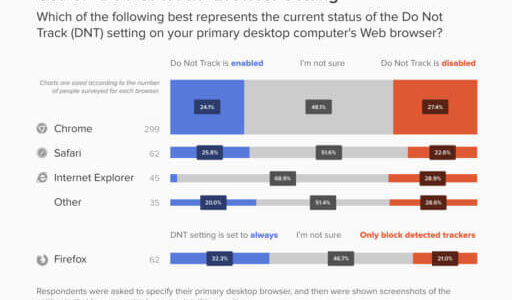
In a push we feel is likely to go nowhere, search engine DuckDuckGo has announced the “Do-Not-Track Act of 2019”, draft legislation that would legally require websites to honor users’ tracking preferences. For those unfamiliar, Do-Not-Track (DNT) is a voluntary setting you can toggle in your browser to instruct websites not to track you for advertising purposes. Were the act to pass, sites would be required to stop tracking users with certain methods, which in turn would send less data to marketing and advertising companies.

DNT is currently built into major browsers including Chrome, Edge, Internet Explorer, Firefox, and Opera. It’s currently up to individual websites and networks to respect users’ DNT preferences (or not).

The proposed legislation would address items such as:

  • Enforcement for violations, such as fines
  • Transparency to users on how their data is used
  • Permitted uses, consent, and anonymizing data

DuckDuckGo hopes to retire the current practice of allowing third-party data brokers to track users by default and to limit first-party tracking outside of what the user expects. The given example is Facebook and Whatsapp (owned by Facebook), stating that Whatsapp data couldn’t be used to determine what Facebook or Instagram advertising would be shown to you.

You can read more about DuckDuckGo’s proposal here.

Filed Under: Security

January 7, 2019 By Brandon Schwartz Leave a Comment

Easiest Way to Use HTTPS with WordPress

Easiest Way to Use HTTPS with WordPress

We’re a fan of easy. As one of our clients says about legal issues, the toughest problems will yield to the simplest solutions. SSL, which encrypts traffic on a website, has a reputation for being a tough problem.

It used to be, and in some applications it still is judging from the unanswered question this author had back in June 2017. With WordPress, it’s quickly becoming very easy.

This article discusses what we feel is the (second) easiest way to use HTTPS with WordPress. We have found this approach to be easiest, second only to buying a hosting plan that already includes SSL, like WP Engine. If you don’t feel like switching hosts, or are like us and sometimes have to work in the confines of other hosting companies, this approach will allow you to use HTTPS with WordPress in a snap.

  1. Step One: Sign up for a Cloudflare account. It’s free. Cloudflare has a few paid plans for the bold (or for those with extensive security or traffic concerns). For the rest of us, the free website plan works just fine.
  2. Step Two: Cloudflare will prompt you to add a site. Go ahead and enter the address of the website you want to use HTTPS with. Cloudflare will perform a scan on the domain name settings (DNS).
  3. Step Three: Check to make sure the DNS records match those found with your registrar. If they do, follow the next prompt.
  4. Step Four: Cloudflare will provide you with two nameservers and will tell you which two existing nameservers need to be replaced with these new ones. It’s important to replace the corresponding existing nameserver with the exact one provided by Cloudflare.
  5. Step Five: Relax while Cloudflare picks up the nameserver change.
  6. Step Six: Once the nameserver change has been picked up by Cloudflare, you’ll receive an email informing you that the site has been added to your Cloudflare account. Be excited! We’re almost done.
  7. Step Seven: Visit the Cloudflare dashboard for the website and click the “Crypto” button near the top of the page. You’ll want to update two settings. First, make sure SSL is set to “Flexible”. Second, make sure that “Always Use HTTPS” is checked to “On”.
  8. Step Eight: Wait a few minutes, then visit the website. You should automatically be taken to an HTTPS version of the site. Your browser has information that it’s secure.


For most people, this should be enough to establish secure connections to a website. Some industries may require additional security measures outside of simply enabling SSL.

If you’ve followed these instructions and are having issues with your website breaking or not loading properly, uncheck “Always Use HTTPS” and give us a call at (408) 429-0585.

Filed Under: Security

July 11, 2018 By Brandon Schwartz Leave a Comment

Google Chrome & SSL (HTTPS)

Google Chrome & SSL (HTTPS)

The Challenge: One of the largest browsers will begin marking websites as “not secure” if they don’t have SSL / HTTPS.

What We’re Doing for Clients: Any and all websites hosted and maintained by Boomajoom have SSL / HTTPS included by default.


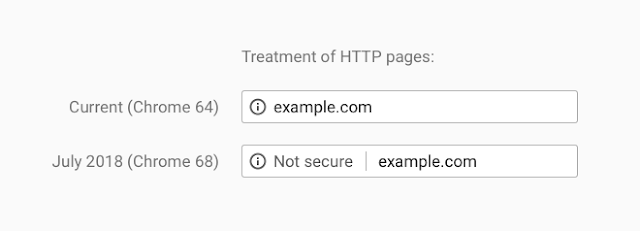
Google Chrome enjoys an approximate 58% marketshare in the United States (source). This means that more than one in two users go online with Chrome. In addition, the underlying engine of Chrome, called Chromium, powers many other browsers with smaller marketshare including Opera. Beginning with the July 2018 update to Chrome (called Chrome 68), Google Chrome will begin displaying warning messages to users who access websites that don’t include SSL / HTTPS. The warnings look as follows:

You may be wondering a few things. Let’s go through the basics.

What is HTTP vs HTTPS?

Your browser (Google Chrome, Mozilla Firefox, Apple Safari, Microsoft Internet Explorer, etc.) all make requests to other computers connected to the internet that host websites. The protocol of this request allows any client (browser, program, other website) to make a similar request and read the response received from the website. This protocol is called “Hyper-Text Transfer Protocol” or abbreviated as “HTTP”. When your browser makes an HTTP request to a computer hosting a website, an HTTP response is sent giving you the website page you’re requesting – or an error message if something goes wrong. This occurs in “plain text” which means that my browser might say “give me example.com” and the responding computer says, “here is example.com”.

HTTPS is an added layer of security. Instead of “give me example.com”, your browser sends a scrambled code to the other computer that has the key to unscramble the code. Then it sends a scrambled code back to the user and the browser unscrambles everything to show you the web page you wanted to see. This is a very simplified way to explain it.

Why is SSL?

SSL is just an acronym standing for “Secure Socket Layer”. It’s the line of communication between the client (browser, program, other website) and the website the client is requesting information from. When SSL exists, HTTPS communication can happen.

Why Do I Want HTTPS / SSL?

First because browsers are beginning to flag websites as “not secure” that use standard HTTP. We’ve met with clients who have customers who refuse to fill out forms on websites because they don’t support HTTP / SSL. If a hacker attacks the user or the computer hosting the website, they can intercept all the plain-text information sent between the two. Encrypting the information in code makes that harder.

Second, some professions almost always require it by law. For example, banks and online stores handle sensitive financial information. If they didn’t have HTTPS / SSL, they risk exposing bank logins and credit card numbers to attackers. As another example, attorneys and medical professionals handle sensitive information belonging to the people they meet with. Not protecting that information can mean their customers could be blackmailed or prosecuted wrongfully, and could mean fines and punishment for the professional that didn’t protect that information.


In summary, HTTPS / SSL is the future of much of the web. Not all websites require it, particularly if the website doesn’t have any forms to fill out or otherwise collect sensitive information. But most business owners should consider insisting on a secure website. HTTPS / SSL is becoming easier than ever to set up thanks to the work of outstanding non-profits like the Electronic Frontier Foundation.

Filed Under: Security

  • Facebook
  • GitHub
  • LinkedIn
  • Phone
  • Twitter

Blog Categories

  • Search Engine Marketing (SEM)
  • Search Engine Optimization (SEO)
  • Security
  • Social Media

Get in Touch

408-429-0585

482 Pendragon St.
Manteca, CA 95337

Newsletter

Get the latest news, events and announcements straight to your inbox.

Copyright © 2026 · Boomajoom, LLC · Privacy Policy